
Release 0.8.2
Appearance control now lives inside Settings.
v0.8.2 adds app-wide appearance switching, keeps that preference in iCloud Backup, and makes Settings feedback clearer.
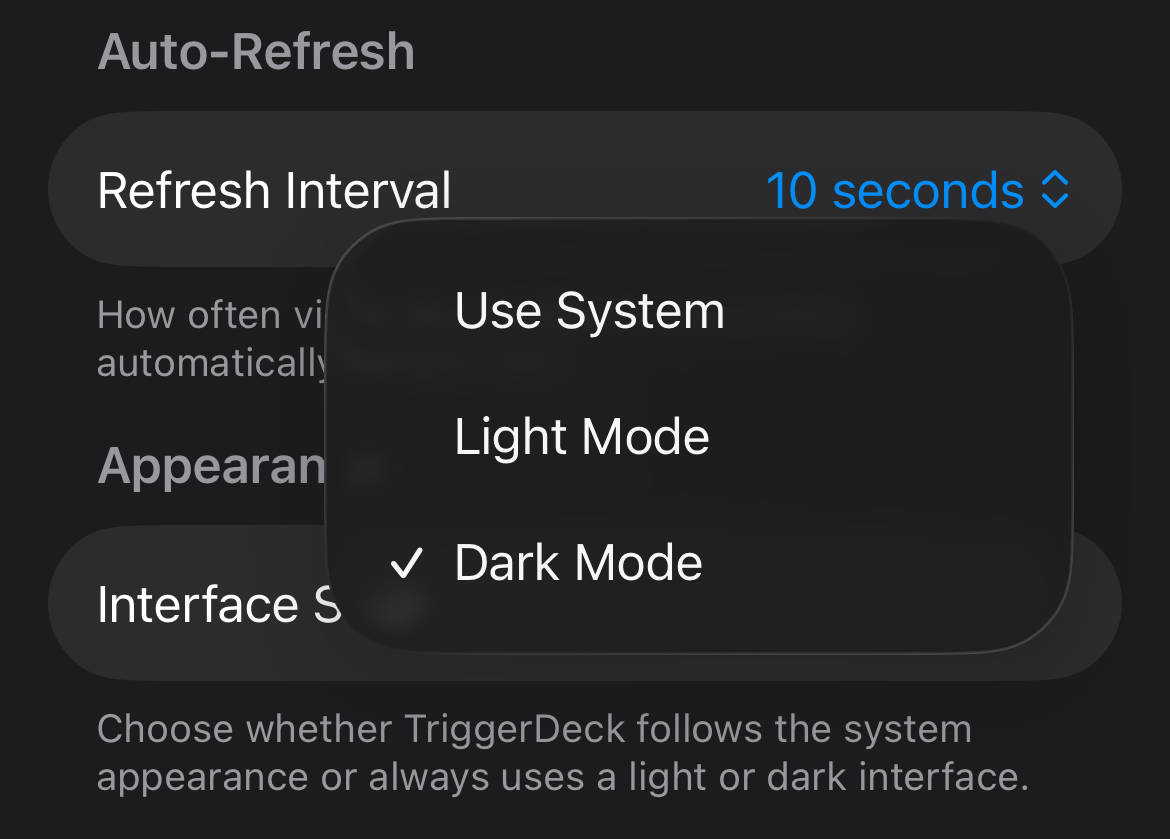
Interface Style
The app can now follow your preferred look instead of only the system default.
TriggerDeck now adds an Interface Style control in Settings with Use System, Light Mode, and Dark Mode, so the app can match either the device or the operator's preferred working contrast at any time.
Appearance
Light and dark themes are now first-class app choices.
The selected appearance applies across the app immediately, making it easier to move between a brighter daytime view and a darker monitoring workspace without restarting or re-entering the flow.
iOS App Functionality
v0.8.2 adds appearance controls in Settings, keeps that preference aligned with backup and restore, and makes the Settings flow clearer.
- Added an Interface Style setting in Settings with Use System, Light Mode, and Dark Mode, and the chosen appearance now applies immediately across the app.
- Fixed Settings so switching Interface Style back to Use System updates the open settings screen immediately instead of waiting for it to be reopened.
- Improved Settings so Auto-Refresh and Interface Style now share the same blue picker styling.
- Added appearance preference backup and restore through iCloud Backup.
- Improved iCloud Backup so Back Up Now shows a clear success confirmation and restore keeps the API-token reminder explicit.
- Moved the iCloud Backup section to the bottom of Settings for a cleaner layout.
- Fixed Update Server so editing one server only refreshes push registration for that server instead of all configured servers.