
Release 0.8.1
Items, Charts, and Dashboards expand the iPhone workflow.
v0.8.1 expands the iPhone workflow with charts, Items, dashboards, refreshed Problem Details, clearer push presentation, and a tighter bottom app shell.
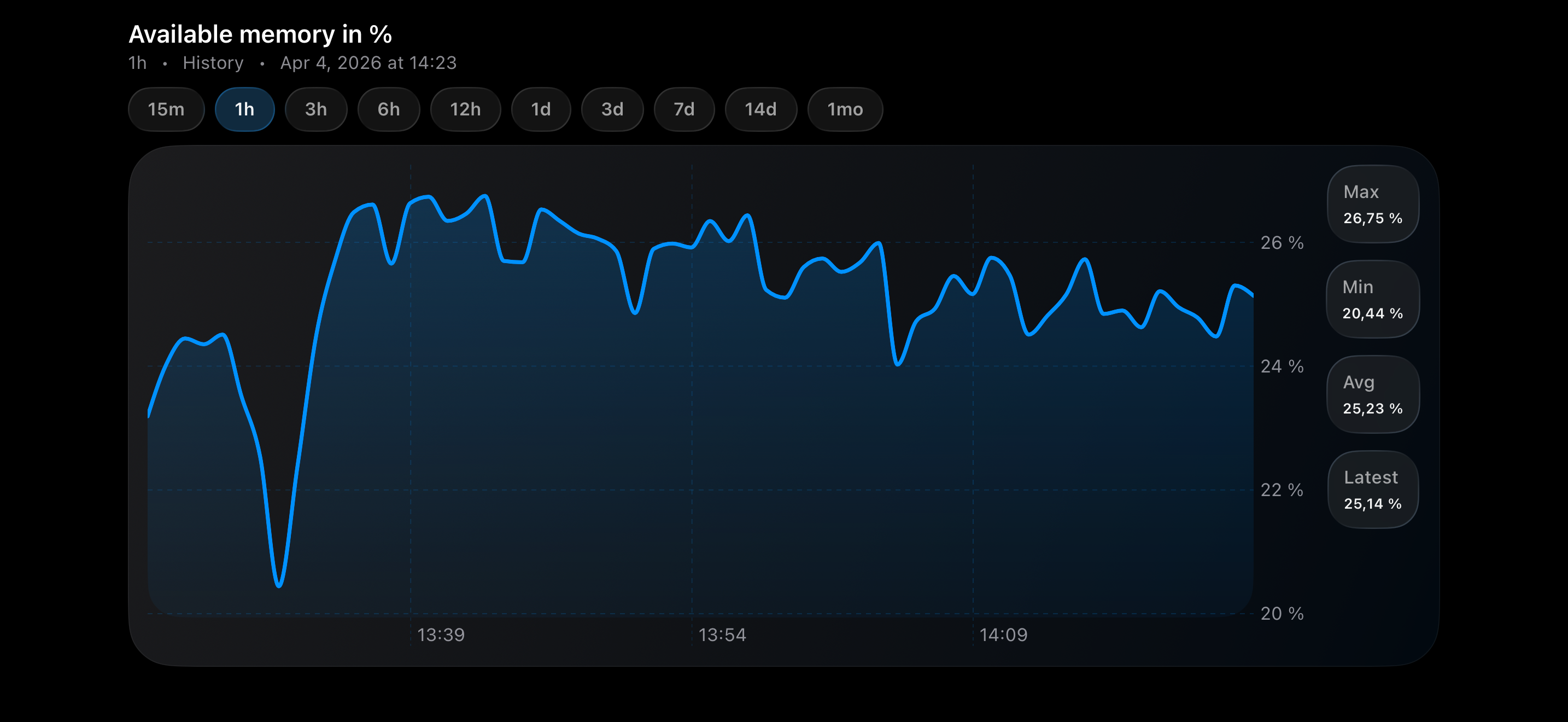
Charts
Numeric trends are now readable without leaving the app workflow.
Numeric values can now open dedicated charts with shared ranges, thresholds, and direct value inspection, making it much easier to read short-term spikes and longer monitoring patterns from the iPhone itself.
Problem Details
Problem Details has been rebuilt into a clearer operational view.
The detail screen now uses a cleaner card-based layout with stronger hierarchy, dedicated sections, visible severity, and technical metadata that make the alert easier to scan when you need context fast.
Items
Latest values get their own working surface.
The new Items flow turns host-scoped latest values into a first-class screen, with host picking, filters, search, direct chart shortcuts, and refresh controls that stay scoped to the active section instead of the whole app.
Dashboards
Dashboards now read like a phone feature.
TriggerDeck can now open supported dashboards in a landscape-first reader built for iPhone, with remembered per-server selection, page tabs, and support for **Problems** and **Graph (classic)** widgets.
Workspace and setup
Navigation, refresh, and push setup are easier to follow through.
The Liquid Glass bottom shell replaces the older navigation model with a tighter working rhythm across Problems, Hosts, Items, Dashboards, and More. Server editing now makes push status and setup prompts easier to spot, while push messages have also been refreshed to improve readability at a glance.
iOS App Functionality
v0.8.1 expands the iPhone workflow with charts, a new app shell, Items, dashboards, refreshed Problem Details, and clearer push flows.
- Added numeric charts from Problem Details and Items, with shared time ranges, threshold lines, and direct value inspection.
- Added iCloud backup and restore for server setup and saved app preferences, with guidance when API tokens must be re-entered after restore.
- Added a Liquid Glass bottom app shell with inline search, More, and section-scoped Refresh actions across core monitoring screens.
- Redesigned Problem Details with card-based sections, a severity badge, technical metadata, and separate chart or refresh controls per latest-data row.
- Added a dedicated Items workflow with host selection, filters, search, direct chart shortcuts, and more reliable loading and state restore.
- Added Dashboards with remembered per-server selection, a landscape reader, page tabs, and support for Problems plus Graph (classic) widgets.
- Improved server and push setup with remembered server selection, per-server push status and
UNIQUE_UID, a one-time prompt to enable notifications after the first saved server, and more readable push presentation.